

A question that comes up often: is there a log that shows who last modified a job or schedule? The answer is yes, but it is not in the system log files. OpCon maintains a comprehensive audit trail of all object changes in the database, and you access it through the Reporting section in Solution Manager.
Where to Find It
The Audit History report is located in the Reporting section of Solution Manager, not under Logs. To get there:
- In Solution Manager, go to Library and navigate to Reporting
- Select Audit History from the reports list
The report opens with columns for Date & Time, Username, Machine, Data Changed, Original Value, Final Value, Category, and Name.
Filtering the Results
Every change made to an OpCon object is automatically recorded in the database. This happens continuously in the background without any configuration required. To narrow it down to what you are looking for, use the filter icon on any column header to add filter criteria.
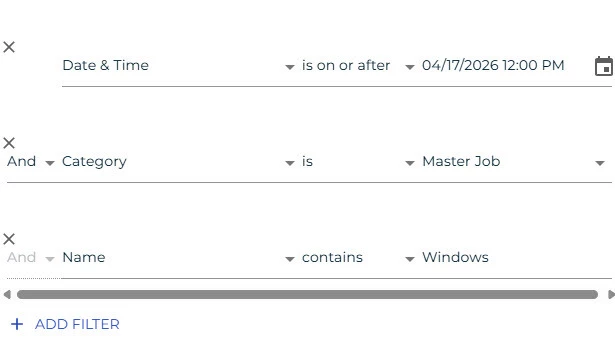
All columns can be used as filters:
- Date & Time: set a date range to focus on a specific period
- Username: filter by a specific user account to see all changes made by that person
- Machine: filter by the machine associated with the change
- Data Changed: filter by the type of field or record that was modified
- Original Value: filter by what the value was before the change
- Final Value: filter by what the value was changed to
- Category: filter by object type, such as Master Job, Schedule, or Machine
- Name: filter by the name of the specific job or schedule you are investigating
✏Note: Filters can be stacked. For example, you can filter by Date & Time and Category together to see only Master Job changes within a specific window.
Downloading the Report
To export the results, click the Download Audit History Report button at the top of the page. This exports the current view, including any filters you have applied, making it easy to share findings or attach to a support case.
What the Report Covers
The Audit History report covers all OpCon objects: job definitions, schedule definitions, machine configurations, user accounts, global properties, and more. Every entry records:
- The date and time the change was made
- The user account or application that made it
- The specific field or record that changed
- Both the original value and the new value after the change
What the Audit Trail Does Not Cover
The audit trail tracks changes made through OpCon’s own interfaces and services. It does not cover changes made directly to the OpCon database outside of the application, which should not occur in normal operations.