


Manage File Arrival Reaching End Time With Exit Code 1

  • December 5, 2024
  • 3 replies
  • 144 views

AndreaDowning
Forum|alt.badge.img

When a File Arrival job reaches it end time and no file was found, its ends with an exit code 1 and a failed status.

Sometimes, not finding a file is normal and you may want to manage this possibility and avoid your job ending as failed. However, exit code 1 is used not only for this special case but also for another reason that makes it a bit more difficult to just simply use the advanced failure criteria of your job.

According to the documentation, the exit code 1 is not only returned for a file not found, more information below:

"The file was not found. Reasons include an invalid filename, the file has not arrived yet, or permissions."

This is also true for UNIX and IBM i file arrival jobs.

How to manage this?

Let's take an example, below my File Arrival definition:

The job end time is 11:00 PM.

The next step is to set an event to mark the job as Finished OK if the exit code is equal to 1 AND if the system time is superior to the end time of the job:
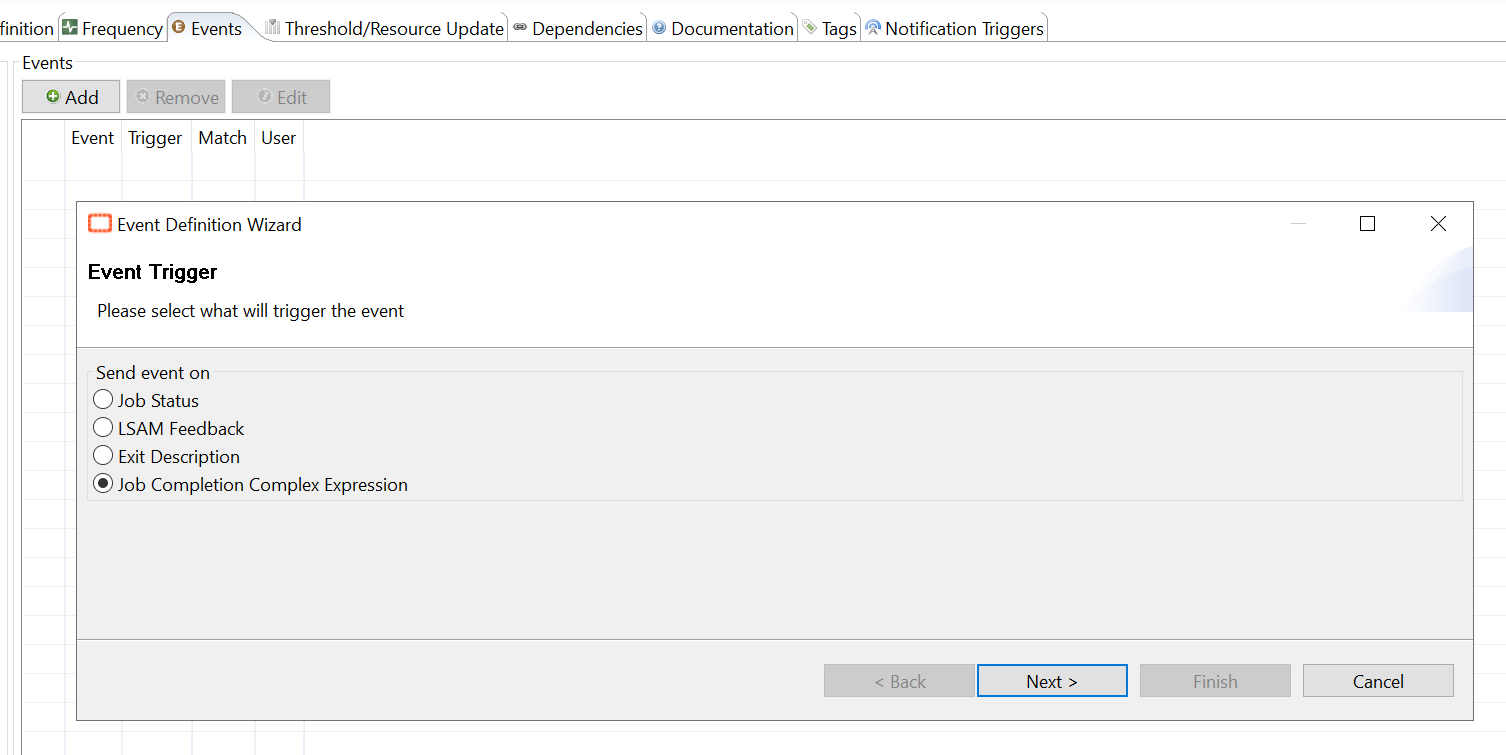
The complex expression used:

[[$JOB TERMINATION]]=="0000000001" && [[$TIME]]>"23:00:00"

Note

Following your Regional Settings, you may have to specify "AM" or "PM", e.g. "11:00:00 AM".
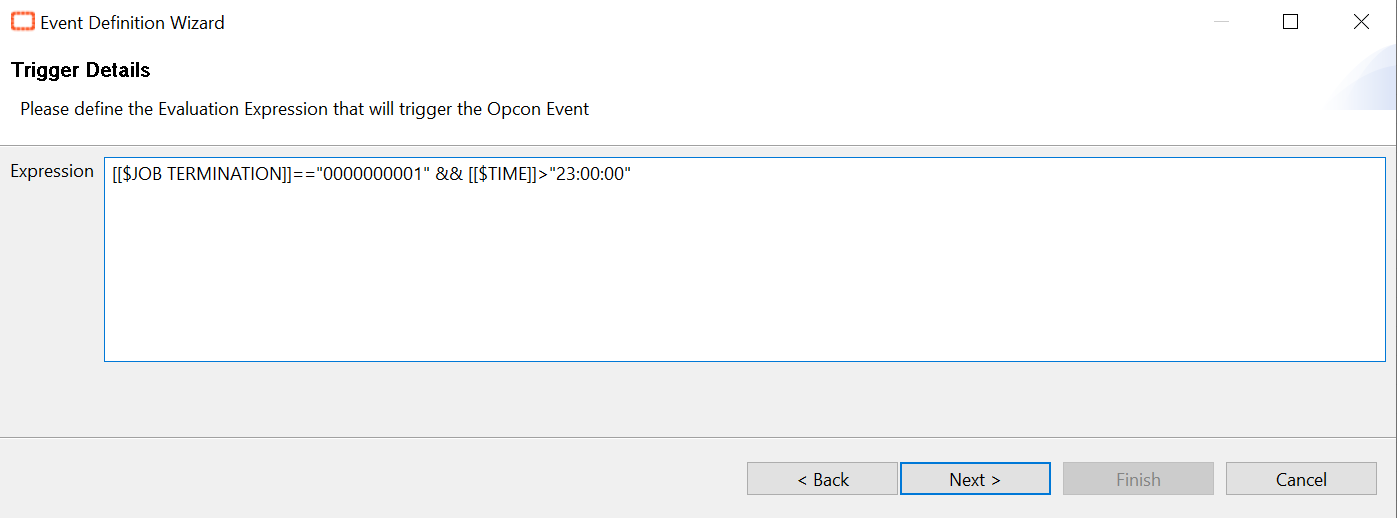
 The event used in this case: $JOB:GOOD
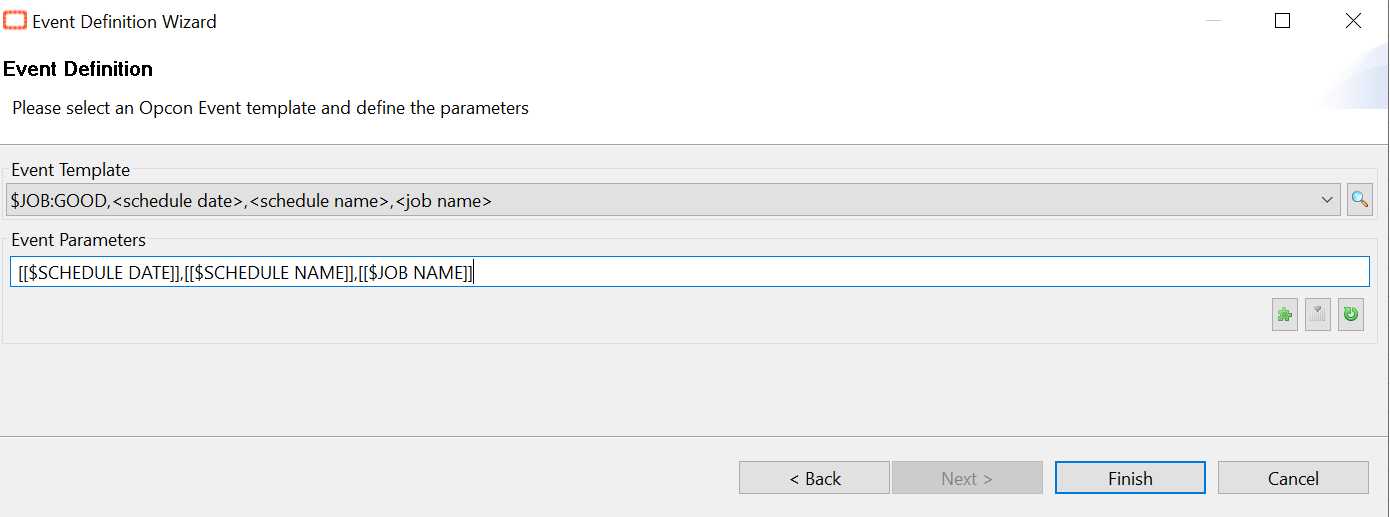
In conclusion, with this solution if the File Arrival job finishes normally but without finding the file, it will be automatically set a Mark Finished OK.

3 replies

  • January 5, 2026

Hello Andrea!

So I have this working, but trying to work around a couple of things here in our enviroment.  We are still fairly new to OpCon and learn, so maybe I am just overlooking something.

I have multiple File Arrival jobs setup and at the end of the night each one fails and I’m trying to prevent that.  I’ve setup a TEST job to see how the solution provided here works and if I implement this process, it still generates an email notification (I have failed noticiations set to all jobs by default), trying to figure out how to work around that and avoid the notification from being sent. 

In addition, since it’s marked as OK, any jobs that are setup as an event are running, which in production will create failed jobs I’m sure.

Appreciate any guidance you can provide.

Thanks!

Dale


  • January 12, 2026

Hello Andrea!

So I have this working, but trying to work around a couple of things here in our enviroment.  We are still fairly new to OpCon and learn, so maybe I am just overlooking something.

I have multiple File Arrival jobs setup and at the end of the night each one fails and I’m trying to prevent that.  I’ve setup a TEST job to see how the solution provided here works and if I implement this process, it still generates an email notification (I have failed noticiations set to all jobs by default), trying to figure out how to work around that and avoid the notification from being sent. 

In addition, since it’s marked as OK, any jobs that are setup as an event are running, which in production will create failed jobs I’m sure.

Appreciate any guidance you can provide.

Thanks!

Dale


Hi Dale and Andrea, 

The first part of Dale’s comment would be something I am interested in as well.
In our production environment we have built PowerShell scripts to solve for this problem of the basic File Arrival job. It’s more cumbersome, but it was a need since we are using them for time-sensitive files that we need to have a notification manager and escalation rule associated with. 

The second part of undesired events being triggered by a job being marked finished OK I think can be improved by using more granular events.
I always try to use specific exit codes for the more sensitive events such as $JOB:ADD. Simply changing your events from a “job status finished OK” to “exit description equal to 0” might solve this one for you.
And even more granularity could be used in a complex expression like Andrea’s post is talking about. So, if you can say for sure that there is a specific time window when the file arrival should only trigger the downstream events, then that would be a potential way to tackle it.


AndreaDowning
Forum|alt.badge.img
  • Author
  • Continuous Community Team
  • January 12, 2026

Hi ​@dclevenger and ​@jameskr

First, this article is from our original Knowledge base center that we used to house in the customer support portal. So, seeing this conversation here actually makes me happy because before we wouldn’t have been able to have this dialogue about it. 

Second, I chatted with ​@AutomationWizard and ​@cordyramer to get some insight about adjusting a couple of things to optimize the workflow. Based on our subject expert’s guidance, here’s what they recommended:

Use “Cancelled” Instead of “Good”

Rather than marking the job as Finished OK, consider marking it as Cancelled when the file isn’t found. This approach prevents downstream jobs from triggering because “Cancelled” is treated differently than “Good” in event logic. It’s a cleaner way to indicate that the job didn’t fail due to an error but also shouldn’t kick off dependent processes.

Apply the Status Change Before End Time

If you do want to automate this, set the event to mark the job as “Cancelled” several minutes before the defined end time. This helps avoid timing issues and ensures the status change happens predictably. For example, if your end time is 11:00 PM, you might trigger the event at 10:55 PM.

Handle Notifications

Since your environment sends failure notifications by default, marking the job as “Cancelled” should stop those alerts because the job will no longer be in a failed state. If notifications persist, you may need to review your notification rules to ensure they exclude “Cancelled” statuses.
