

Manage File Arrival Reaching End Time With Exit Code 1

  • December 5, 2024
  • 5 replies
  • 252 views

Forum|alt.badge.img

When a File Arrival job reaches it end time and no file was found, its ends with an exit code 1 and a failed status.

Sometimes, not finding a file is normal and you may want to manage this possibility and avoid your job ending as failed. However, exit code 1 is used not only for this special case but also for another reason that makes it a bit more difficult to just simply use the advanced failure criteria of your job.

According to the documentation, the exit code 1 is not only returned for a file not found, more information below:

"The file was not found. Reasons include an invalid filename, the file has not arrived yet, or permissions."

This is also true for UNIX and IBM i file arrival jobs.

How to manage this?

Let's take an example, below my File Arrival definition:

The job end time is 11:00 PM.

The next step is to set an event to mark the job as Finished OK if the exit code is equal to 1 AND if the system time is superior to the end time of the job:
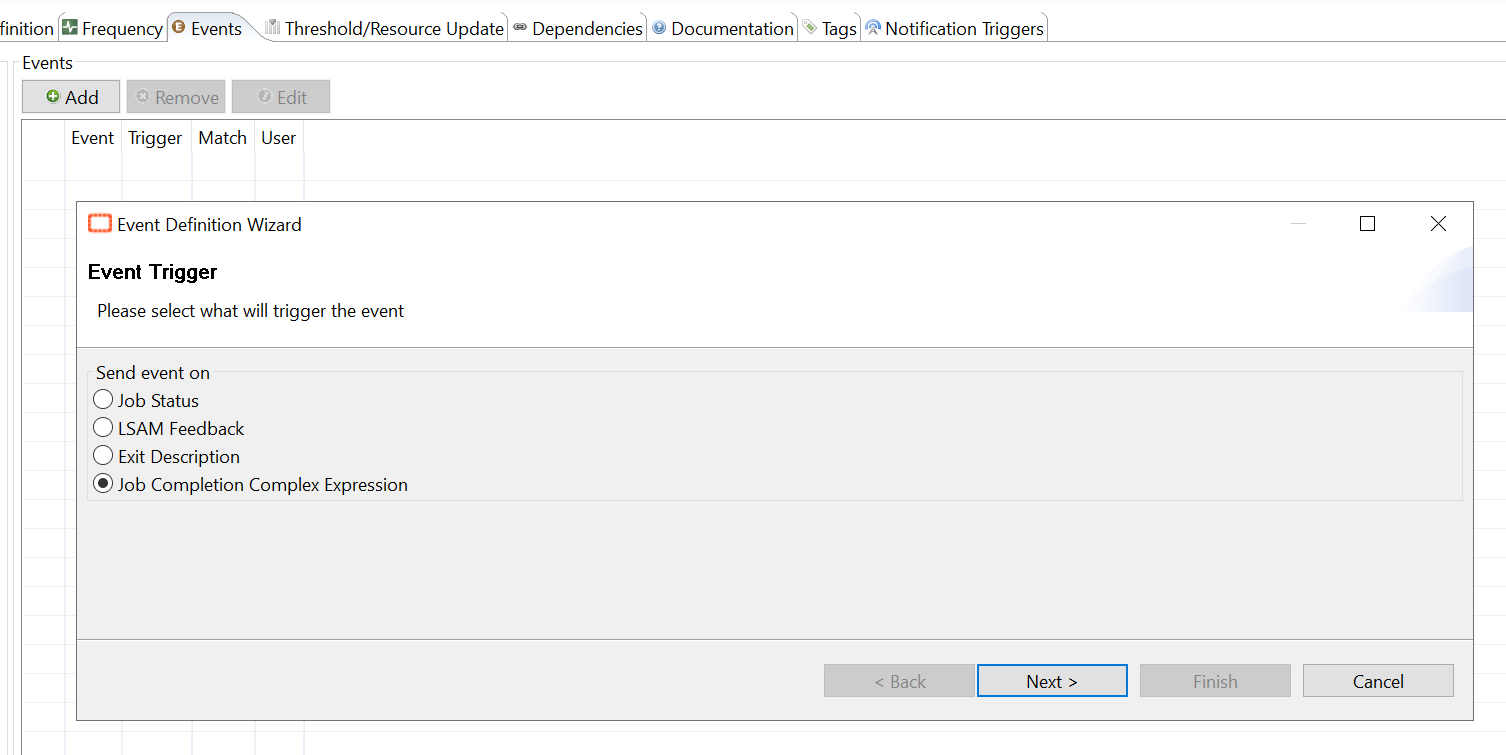
The complex expression used:

[[$JOB TERMINATION]]=="0000000001" && [[$TIME]]>"23:00:00"

Note

Following your Regional Settings, you may have to specify "AM" or "PM", e.g. "11:00:00 AM".
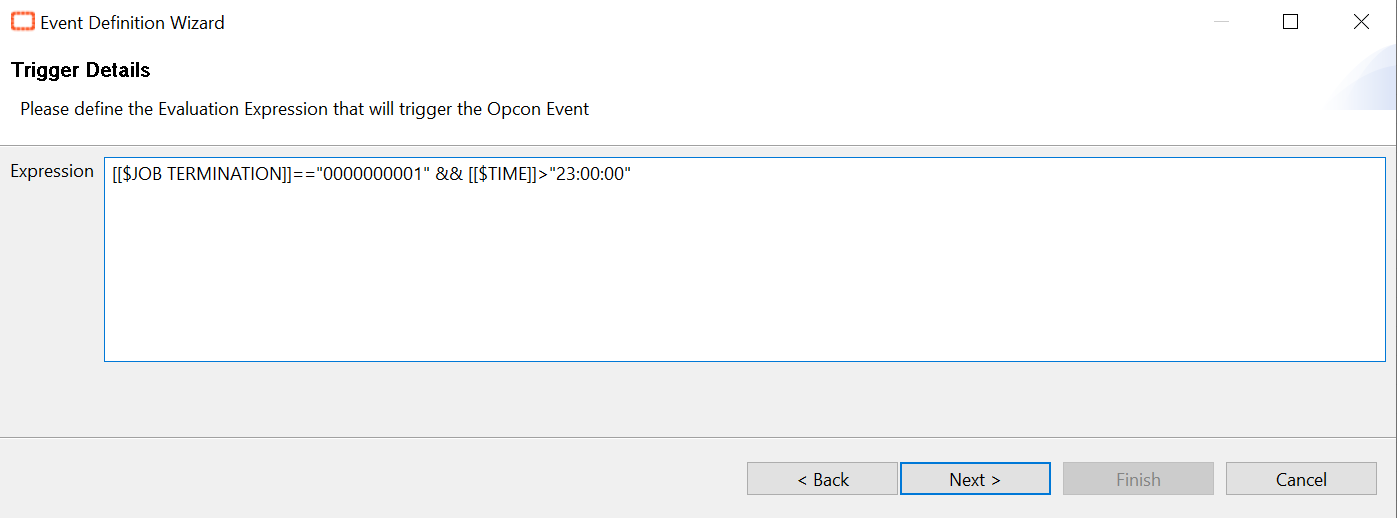
 The event used in this case: $JOB:GOOD
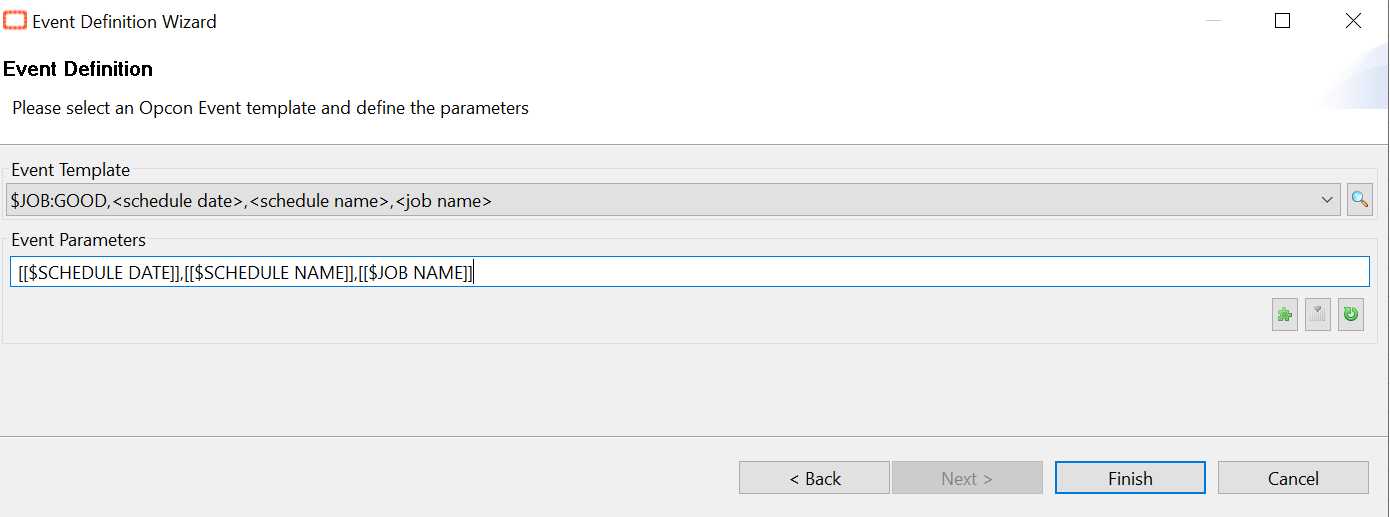
In conclusion, with this solution if the File Arrival job finishes normally but without finding the file, it will be automatically set a Mark Finished OK.

5 replies

Forum|alt.badge.img
  • January 5, 2026

Hello Andrea!

So I have this working, but trying to work around a couple of things here in our enviroment.  We are still fairly new to OpCon and learn, so maybe I am just overlooking something.

I have multiple File Arrival jobs setup and at the end of the night each one fails and I’m trying to prevent that.  I’ve setup a TEST job to see how the solution provided here works and if I implement this process, it still generates an email notification (I have failed noticiations set to all jobs by default), trying to figure out how to work around that and avoid the notification from being sent. 

In addition, since it’s marked as OK, any jobs that are setup as an event are running, which in production will create failed jobs I’m sure.

Appreciate any guidance you can provide.

Thanks!

Dale


Forum|alt.badge.img
  • January 12, 2026

Hello Andrea!

So I have this working, but trying to work around a couple of things here in our enviroment.  We are still fairly new to OpCon and learn, so maybe I am just overlooking something.

I have multiple File Arrival jobs setup and at the end of the night each one fails and I’m trying to prevent that.  I’ve setup a TEST job to see how the solution provided here works and if I implement this process, it still generates an email notification (I have failed noticiations set to all jobs by default), trying to figure out how to work around that and avoid the notification from being sent. 

In addition, since it’s marked as OK, any jobs that are setup as an event are running, which in production will create failed jobs I’m sure.

Appreciate any guidance you can provide.

Thanks!

Dale


Hi Dale and Andrea, 

The first part of Dale’s comment would be something I am interested in as well.
In our production environment we have built PowerShell scripts to solve for this problem of the basic File Arrival job. It’s more cumbersome, but it was a need since we are using them for time-sensitive files that we need to have a notification manager and escalation rule associated with. 

The second part of undesired events being triggered by a job being marked finished OK I think can be improved by using more granular events.
I always try to use specific exit codes for the more sensitive events such as $JOB:ADD. Simply changing your events from a “job status finished OK” to “exit description equal to 0” might solve this one for you.
And even more granularity could be used in a complex expression like Andrea’s post is talking about. So, if you can say for sure that there is a specific time window when the file arrival should only trigger the downstream events, then that would be a potential way to tackle it.


Forum|alt.badge.img
  • Author
  • Continuous Community Team
  • January 12, 2026

Hi ​@dclevenger and ​@jameskr

First, this article is from our original Knowledge base center that we used to house in the customer support portal. So, seeing this conversation here actually makes me happy because before we wouldn’t have been able to have this dialogue about it. 

Second, I chatted with ​@AutomationWizard and ​@cordyramer to get some insight about adjusting a couple of things to optimize the workflow. Based on our subject expert’s guidance, here’s what they recommended:

Use “Cancelled” Instead of “Good”

Rather than marking the job as Finished OK, consider marking it as Cancelled when the file isn’t found. This approach prevents downstream jobs from triggering because “Cancelled” is treated differently than “Good” in event logic. It’s a cleaner way to indicate that the job didn’t fail due to an error but also shouldn’t kick off dependent processes.

Apply the Status Change Before End Time

If you do want to automate this, set the event to mark the job as “Cancelled” several minutes before the defined end time. This helps avoid timing issues and ensures the status change happens predictably. For example, if your end time is 11:00 PM, you might trigger the event at 10:55 PM.

Handle Notifications

Since your environment sends failure notifications by default, marking the job as “Cancelled” should stop those alerts because the job will no longer be in a failed state. If notifications persist, you may need to review your notification rules to ensure they exclude “Cancelled” statuses.


  • September 1, 2026

Hi

I try to use this solution, but I have an issue using $TIME property. My system give me hh:mm:ss format (France), but on the ‘complex expression’ when I try [[$TIME]] > ‘23:59:00’ I have an issue:

01/09/2026 14:37:20.573    01/09/2026:999_TEST:999_TEST_test_file_arrival [0000214193]: Failed (Advanced Failure Criteria) Return Code='+000000001:0000:'
01/09/2026 14:37:20.674    An error was returned from Expression Evaluator: This operator does not belong to the list of recognized operators: '.
01/09/2026 14:37:20.674      In job '01/09/2026:999_TEST:999_TEST_test_file_arrival'.

Any idea?


Forum|alt.badge.img
  • Author
  • Continuous Community Team
  • September 2, 2026

Hi ​@philmon,

Two things going on here — the second one is the real blocker.

The immediate error is the quote characters. The Expression Evaluator only accepts double quotes (") around string literals. A single quote isn’t a recognized token, which is exactly what it’s reporting:

This operator does not belong to the list of recognized operators: '

So, [$TIME]] > '23:59:00' needs to be [[$TIME]] > "23:59:00".

But fixing the quotes alone won’t make it work, because of this line in your log:

Return Code='+000000001:0000:'

Your agent is returning the UNIX/Linux format, not the 0000000001 shown in the article — that example is Windows-specific. So [[$JOB TERMINATION]]=="0000000001" will never match, whatever the quoting.

Worth knowing: on Linux agents this value changed at version 24, from -000000001:0000: to +000000001:0000:. If you’d built a working expression before an upgrade, that’s enough to break it silently.

Confirm your actual value before rewriting the expression. Add a temporary event on job completion:

$CONSOLE:DISPLAY,[[$JOB TERMINATION]]

Let the job expire, then read the exact string from the SAM log and use it character for character. Based on your log, that gives you:

[[$JOB TERMINATION]]=="+000000001:0000:" && ToInt([[$TIMEhhnn]])>=2359

You can use ToInt([[$TIMEhhnn]]) rather than a string time comparison deliberately — it sidesteps the format question entirely. Note that [[$TIME]] follows your OpCon server’s regional settings, not your country, so the AM/PM note in the article isn’t a reliable guide; I’ve seen both forms needed at French sites. The numeric form needs a global property named $TIMEhhnn with the value hhnn.

One design caveat. Your end time is 23:59, and the time comparison evaluates at the moment the job completes. If the job finishes after midnight, [[$TIME]] has already rolled to 00:00:xx, the condition is false, and the job stays Failed. This catches people out regularly. Either give yourself margin (end time 23:55, compare against 2355), or skip the expression and set Advanced Failure Criteria on the job instead:

  • Equal to 0 → Finished OK
  • Or Equal to 1 → Finished OK

That has no time or locale dependency at all. The tradeoff is that it also treats a bad path, wrong filename, or permissions failure as success, since those return exit code 1 too. Use the expression if you need to keep those Failed; use the failure criteria if a missing file is always acceptable. Don’t configure both for the same condition.

Last thing — your log shows the job evaluating at 14:37:20, which isn’t > 23:59:00. So even once the syntax and exit code are right, testing mid-afternoon will still show Failed, correctly. To validate the setup, temporarily set the end time a minute or two ahead of the current clock, match that value in the expression, and let the window expire.


If you are still seeing the issue after making adjustments, we would recommend contacting support for assistance.
